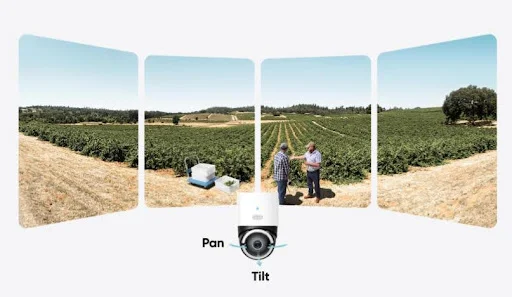
Installing a security camera without WiFi is easier than most people expect. Many modern cameras operate fully offline, saving footage locally and offering reliable monitoring without needing a router or internet connection. These systems work well for remote properties, garages, sheds, farms, and any location where WiFi signals are weak or unavailable. Some homeowners choose offline-capable options from eufy because they appreciate strong local storage and dependable performance, but the same installation principles apply to any model. Understanding how a no wifi security camera works helps you set up a stable, secure system that records clearly and consistently—no internet required.
Choosing the Right Camera Type, Power Source, and Storage
Select a Camera Designed for Offline Operation
Installation begins with choosing a camera that can function without internet access. Not all wireless or smart cameras offer offline capability, so selecting the right device is essential. Cameras that record to SD cards, internal memory, or local hubs allow offline operation even if they typically support online features. Look for devices that can create local access points, connect to phones directly, or store footage on physical drives. Many homeowners prefer local-first options from eufy because they provide strong offline support with built-in storage and encrypted local access. Regardless of the brand, a camera built for offline use gives you a solid foundation for installation.
Choose a Reliable Power Source for Continuous Operation
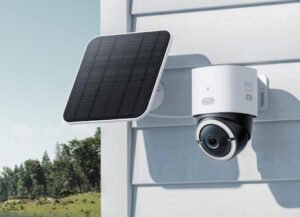
A security camera without WiFi still needs power, and the power setup determines how consistent your footage will be. For indoor spaces or nearby outdoor outlets, a wired power adapter ensures the camera runs continuously. For remote areas, solar-powered or battery-based systems are common. When choosing a power method, consider how long the camera must operate, local weather conditions, and whether the location regularly receives sunlight if using solar. Wired setups often offer the most consistency, but many people choose flexible battery or solar options depending on their environment. A stable power plan ensures the camera remains active at all times.
Decide How You Will Store and Access Footage
Since the camera won’t send video to the cloud, local storage becomes the primary method for saving recordings. Most offline-capable cameras support microSD cards or local hubs where footage is stored securely. Larger properties may use NVR (Network Video Recorder) systems with multiple channels for expanded coverage. When evaluating storage, consider capacity, file organization, and how often you’ll retrieve recordings. SD cards are ideal for smaller setups because they are simple, portable, and easy to manage. Local hubs and NVR systems allow more storage and centralized playback. Choosing the right storage option allows you to review recorded clips easily whenever you need them.
Installing, Positioning, and Managing a No-WiFi Camera
Mount the Camera for Clear Views and Stable Coverage
Placement affects recording quality just as much as the camera itself. To install the camera, choose a location that captures essential areas like entrances, driveways, and walkways. Mount the device at a height high enough to avoid tampering but low enough to capture clear facial details. Angling the camera downward slightly reduces glare and blind spots. Outdoor installations may require weatherproof brackets or additional shielding to protect the device from intense sunlight or rain. A well-placed camera ensures reliable footage without needing to rely on WiFi for real-time adjustments or remote angle control.
Connect Your Phone Directly for Setup and Monitoring
Even without WiFi, you can still connect to the camera for live viewing or settings adjustments. Many offline-capable cameras create a direct Wi-Fi hotspot or Bluetooth link that your phone can join. This short-range connection allows you to access the camera’s interface, check angles, update settings, or play back locally stored clips. Systems such as those from eufy often provide simple mobile interfaces that work without external networks, giving users full control even in isolated areas. Direct device-to-phone pairing ensures you can manage your camera’s features whenever you’re nearby, no broadband required.
Maintain the System Through Simple Offline Management
Once installed, maintaining an offline camera involves checking power levels (if battery-operated), clearing storage when full, and occasionally adjusting sensitivity settings. If the camera uses an SD card, you may periodically remove it to transfer footage to a computer or replace it with a new one. Some systems allow you to lock important clips so they remain protected even when loop recording overwrites older files. Regular testing ensures the camera continues recording properly. Offline setups are typically low-maintenance because they avoid cloud server issues, router resets, and network congestion. This simplicity is why many homeowners choose them for long-term reliability.
Conclusion
Installing a security camera without WiFi requires selecting a device built for offline operation, choosing a reliable power setup, and using local storage for recording. Once the camera is mounted and configured, you can access footage directly through SD cards, local hubs, or short-range phone connections. Many users prefer eufy because its cameras support strong local recording and simple offline management, but the overall process is the same for any offline-capable model. By planning power, placement, and storage carefully, you can create a dependable security system that captures every important moment—without relying on internet connectivity. A well-designed no-WiFi setup offers privacy, reliability, and strong coverage in any environment, from remote cabins to everyday homes.